Free · Mac · DaVinci Resolve
Find the slow motion hiding in your Sony footage.
Sony conforms S&Q in camera, so a 120fps take imports reading 23.976 and looks exactly like every other clip in the bin. SQ Finder reads what the camera actually recorded, tags every slow-motion clip, and fills in the real capture rate.
424 KB · signed and notarized · macOS · free
The problem
They are invisible, not mislabelled
Shoot 120fps S&Q on a 23.976p base and the camera does the math on the card. What lands is a 23.976fps file that is already slowed. It plays correctly, at the right speed, with no conform needed from you.
Which is also the entire problem. The file reports 23.976 because it is 23.976 now, and so does every normal take on the shoot. There is no column to sort and no property to filter. On one production that meant 1,582 slow-motion clips sitting inside nearly 5,000 files with no way to find them by looking.
What the camera does record
It is in the sidecar, in plain text
Next to every clip is an XML file. On an S&Q take, two attributes on the VideoFrame element disagree:
On a normal clip they match. Sony even labels it outright with RecordingMode type="slowAndQuickMotion". Resolve, Premiere and Final Cut all read formatFps and ignore the rest.
SQ Finder reads it, and falls back to measuring every audio channel when the sidecar has gone missing.
How you use it
Scan once, then one smart bin
- 01
Install
Download, open the installer, click through. It puts two entries in Resolve under Workspace > Scripts.
- 02
Scan
Run SQ Finder on an open project. On very large or Blackmagic Cloud projects use SQ Finder Rescan, which works in short bounded passes with a watchdog.
- 03
Make the smart bin
Once per project: Keywords, contains, SQ. Your slow motion collects itself from then on.
Questions
Frequently asked
Why can't I just sort the media pool by frame rate?
Because the frame rate is the same. Sony conforms S&Q on the card, so a 120fps take is written out as a real 23.976fps file that is already slowed. Your normal takes are also 23.976. Nothing in the container distinguishes them, which is why there is no column to sort and no property to filter.
Isn't this the same as fixing a frame rate mismatch?
No, and this is the part that trips people up. The usual advice (Clip Attributes, Change Clip Speed, set the retime percentage) solves the opposite problem: a clip that reports 120fps and plays too fast. Sony S&Q already did that step for you. There is no mismatch to fix. What you have is an identification problem.
Where does the real capture rate actually live?
In the XML sidecar next to the clip. Sony writes captureFps and formatFps on the VideoFrame element inside NonRealTimeMeta. On an S&Q clip they diverge, for example captureFps 119.88p against formatFps 23.98p. On a normal clip they match. Sony also writes RecordingMode type slowAndQuickMotion outright. No editing program reads any of it.
What if the sidecar is missing?
There is a fallback. S&Q clips have audio tracks that are present but silent, because record speed and playback speed differ. SQ Finder measures every channel and treats the clip as slow motion only when all of them are silent. A single silent channel means nothing: on a normal take, the channels with no mic assigned measure silent too. It also confirms the file is actually Sony before trusting that test, so DJI clips are never tagged.
What does it change in my project?
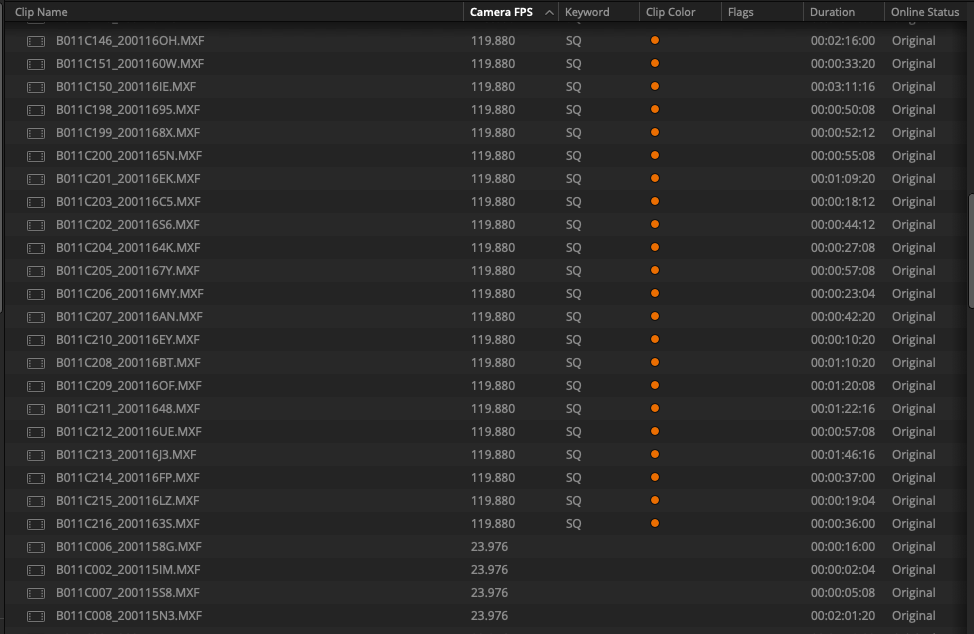
It adds the keyword SQ to slow-motion clips, colors them orange if they have no color yet, and fills in the Camera FPS metadata field when it is empty. It does not move, rename, modify or delete any media. It writes metadata into the project only.
How do I collect them once they are tagged?
One smart bin, once per project: Keywords, contains, SQ. After that the slow motion gathers itself as new clips come in.
Does it work on huge projects?
Yes, via the second menu entry. SQ Finder Rescan runs in short bounded passes through a Terminal window, with a watchdog and a folder frontier, which is what large or Blackmagic Cloud projects need. A copy also lands on your Desktop so you can run it without opening Resolve's Scripts menu.
Is it safe to run? Is it signed?
The installer is signed with an Apple Developer ID and notarized by Apple, so it opens without a Gatekeeper warning. The scripts themselves are plain readable Python, included in the download, so you can read exactly what it does before running it. It is Mac only.
Free, no account
Built by a working DP who got tired of scrubbing
I shoot for a living and I wrote this because I could not tell which of my own clips were slow motion. It is free, the source is in the download, and there is nothing to sign up for.