chimping.io migrate
Bring your Frame.io library home.
A free Mac app that migrates a whole Frame.io library in one sitting. Vimeo libraries migrate too, new in beta. Your projects come down as real folders: originals untouched, folder structure intact, version stacks and timecoded comments preserved. Then, if you want, everything moves to chimping.io looking exactly the way it did on Frame. Use it once, verify, delete it.
v1.1.0 · Apple Silicon · macOS 11+ · signed & notarized
What migrates
- ·Originals, never re-encoded. Every file downloads at full quality into real folders on your drive. The download alone is a complete, keepable backup of your library.
- ·Folder structure, both sides. The tree you built on Frame lands identically on disk, in chimping Deliveries, and in Video Review.
- ·Version stacks stay stacks. A stacked video becomes one chimping review asset with real version history: newest current, older cuts underneath. Or bring only the newest of each.
- ·Comments survive.Timecoded notes carry over onto the right version at the right timecode, with the commenter’s name and original date, plus a comments.csv archive beside the files.
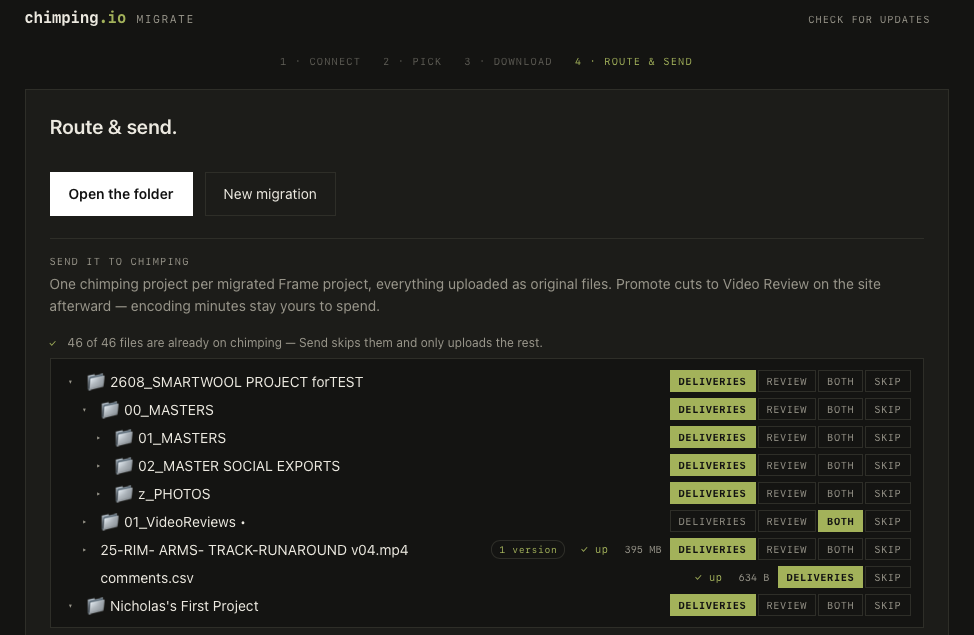
- ·You choose destinations. Route every folder or file: Deliveries (originals, no encoding), Video Review (encoded, commentable), both, or skip.
- ·Interruption-proof. Downloads and uploads both resume where they stopped: no duplicate projects, no re-uploading what already landed.
How it works
- Connect Frame.io: Adobe sign-in for newer accounts (the app includes the one-time two-minute credential setup), or a developer token for older ones.
- Pick projects. Everything’s included by default; uncheck anything you don’t want.
- Download. Real folders on your drive, resumable, with live per-file progress.
- Route & send to chimping.io, or stop here and just keep the local backup.
Questions
What does the migration app actually move?
Everything that matters: original files (never re-encoded), your folder structure exactly as it is on Frame, version stacks (they become one video with version history on chimping, newest on top), and timecoded comments with the commenter's name and original date. Each comment lands on the version it was written on. Comments are also saved to a comments.csv beside the files as a permanent archive.
Do I need a chimping.io account?
Only for the send-to-chimping step, which is optional. Downloading your Frame library to local folders works with just your Frame.io access, no chimping account at all. If you do send to chimping, you route each folder or file to Deliveries (originals, no encoding), Video Review (encoded, commentable), both, or skip it.
How do I connect my Frame.io account?
Newer Frame accounts (the Adobe-era V4 platform) sign in with one click through Adobe. Older Frame accounts paste a developer token from developer.frame.io. Either way, credentials stay on your Mac. If you'd rather run the app against your own Adobe credential, there's a fallback for that too.
Is it safe if my internet drops mid-migration?
Yes. Downloads resume, and files already on disk are skipped. Uploads keep a resume ledger next to your files, so a dropped connection, a paused run, or a closed laptop continues where it stopped, skips everything already uploaded, and never creates duplicate projects.
What does it cost?
The app is free. Downloading your library from Frame is free. Sending to chimping.io uses your chimping plan's normal storage and encoding allowances. Originals to Deliveries don't consume encoding minutes; only videos you route to Video Review do.
Does it work with Vimeo?
Yes, in beta as of v1.1.0. Connect with a Vimeo personal access token (the app walks you through it) and your library comes down the same way: folders preserved, prior versions kept, originals untouched. Two caveats: original downloads need a Vimeo plan with video file access (Pro or higher), and Vimeo's API doesn't expose review notes, so comments stay behind.
Do I keep the app afterward?
No, and that's the point. It's a one-time tool: migrate, verify everything landed, delete the app. Day-to-day uploading, review, and delivery live in the main chimping.io app and site.