Built for · the small studio
Every machine on the same project. Every client on your links.
A small studio's real infrastructure is folders: the project tree on the server, the copy on the edit bays, the exports somebody remembers to upload. When those drift, the studio burns senior time reconciling them. This keeps one tree on every machine, and makes the client-facing side look like a bigger shop than you are.
4 things that go wrong
What burns studio hours, and how this fixes it
The friction
Per-seat pricing taxes growth
Five editors on a per-seat review tool is five subscriptions before anyone cuts a frame, and the freelancer you add for one job becomes a procurement decision.
What this does instead
Flat tiers, no seats. The team works through the owner's project; collaborators join by invite link and their uploads bill the studio's plan, not their own wallets. Adding a freelancer for a week costs nothing extra.
The friction
The project tree drifts between machines
Bay 1 has the new VO, bay 2 doesn't, the server has last week's cut. Someone senior spends Friday reconciling folders by hand.
What this does instead
Project Sync keeps one tree on every machine: a file anyone adds lands everywhere within minutes, folder structure intact, uploads resuming through dropped connections. Local edits win; only the owner can delete.
The friction
Publishing bottlenecks on one person
Editors finish cuts, but 'putting it up for the client' waits for whoever owns the review-tool login, usually at 6pm.
What this does instead
Magic folders remove the step: flag the exports folder for review and the masters folder for delivery. Any editor dropping a render into the folder has published it. The client's link updates on its own.
The friction
The client experience is a patchwork
Cuts arrive from one tool, files from another, masters from a third, each with different branding and a different set of instructions for the client.
What this does instead
Clients touch exactly two kinds of pages, both under the project's name: the review link and the delivery link. No accounts, no installs, consistent every time: small crew, big production value.
A studio week
How a multi-editor project runs
- 01
The project starts as a tree
The Mac app scaffolds the studio's numbered folder template in one click and syncs it. Every bay starts from the same structure on day one.
- 02
Everyone syncs, nobody emails files
Editors, the producer, the AE: each points the app at the project. Footage a PA offloads at the shoot is on the edit bays by the time everyone's back.
- 03
Cuts publish themselves
An editor exports into the flagged review folder from Premiere, Avid, Final Cut, or Resolve. No specific NLE is required. The app uploads it once the render finishes writing. The cut appears on the client's link encoded and comment-ready. No login round-trip, no bottleneck person.
- 04
Feedback flows to whoever's cutting
Client notes sit at timecodes on the link; whichever editor picks up the revision pulls them into Resolve as markers and uploads the next version from the same panel.
- 05
Vendors plug in without accounts
Color and sound get transfer links out and receive links back: folders intact both directions, an email to the studio when their upload lands.
- 06
Masters accumulate in one place
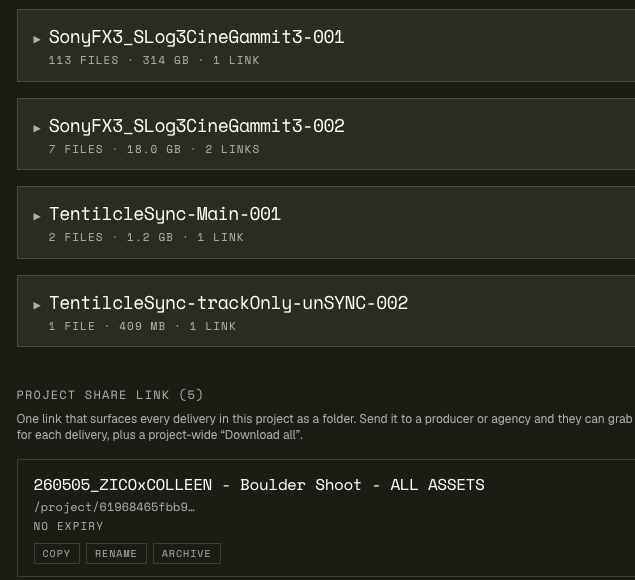
Finals dropped in the masters folder land on the project's delivery link: password-protectable, no expiry, the archive the client link points at for the life of the relationship.
The machine room and the showroom
What the team sees, what the client sees
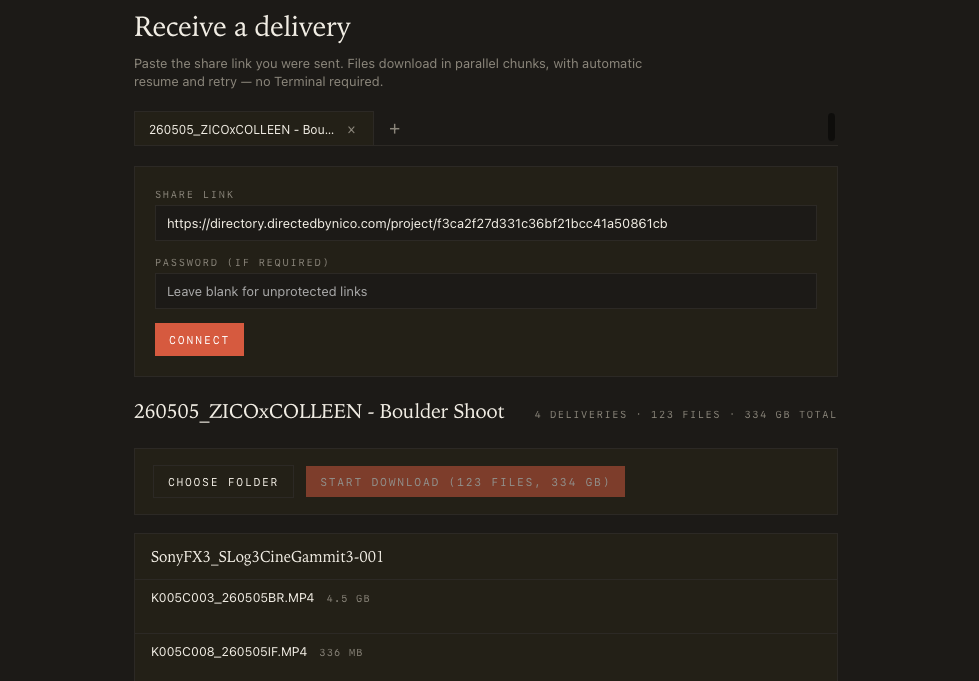
Left: the desktop app keeping a project tree synced across the studio. Right: the polished delivery page the client bookmarks.
Questions studios ask
Frequently asked
How does a team share one subscription?
The studio owns the plan; teammates join projects through invite links. Everyone syncs the same project trees and uploads into the same deliveries. Storage and transfer bill against the studio's tiers, so there's no per-person math and no asking a freelancer to subscribe.
What stops two editors from wrecking each other's files?
Sync is deliberately conservative: local edits always win over cloud copies, deletes are owner-only (and land in a 30-day trash on the site rather than vanishing), and teammates get a clean-up prompt before anything on their own disk is touched. Folders someone flags 'keep local' stay local.
Can we keep our folder template?
Yes. The app ships a one-click project scaffold (the numbered 00_CAMERAORIGINAL … 10_MASTERS convention) and syncs whatever structure you create. Your template is the tree that lands on every machine.
Do magic folders work per project?
Yes. Each project's synced folders carry their own designations, and the destination lists stay scoped to the project you're working in. Flag 01_VIDEOREVIEW for review and 10_MASTERS for delivery once per project, and dropping files is the publish step from then on.
What does the client experience look like?
Two pages, both clean and account-free: a review page (player, timecoded comments, versions, approve button, optional transcript) and a delivery page (folder tree, original-quality downloads, CSV manifest). Both under the project's name. Nothing that says 'small shop using consumer tools'.
Which plan fits a studio?
Studio ($19/month: 1 TB storage, 10 review hours, 750 GB monthly transfer) fits most 2–5 person shops; Pro ($35: 2 TB, 25 hours, 1.2 TB) fits episodic and doc-heavy slates. Heavy delivery month? Upgrade for the cycle, drop back at the next billing date, no annual contract.
How do big uploads behave on a shared office connection?
The Mac app uploads in parallel chunks with automatic resume, and it has an upload speed limiter: cap it to a percentage of your measured uplink or schedule full speed for the night window, so a 200 GB masters push doesn't flatten the office internet at 2pm.
Put one project on it
3-day trial. Sync one active project across your bays and run a client round on it.
If Friday's folder-reconciliation hour disappears, that's the business case.