Built for · approvals & accountability
Know where every cut, note, and file stands.
A producer answers for the parts of post nobody sees: whether the client actually watched the cut, whose note is blocking, whether the deliverables arrived. When that lives across email threads and three tools, you're the one reconciling it at 11pm. This puts the whole approval-and-delivery trail on links you control.
4 things that go wrong
What producers end up chasing, and how this fixes it
The friction
Feedback scattered across channels
One stakeholder emails, one texts, one marks up a screen recording. Consolidating notes into something the editor can cut from is your job now.
What this does instead
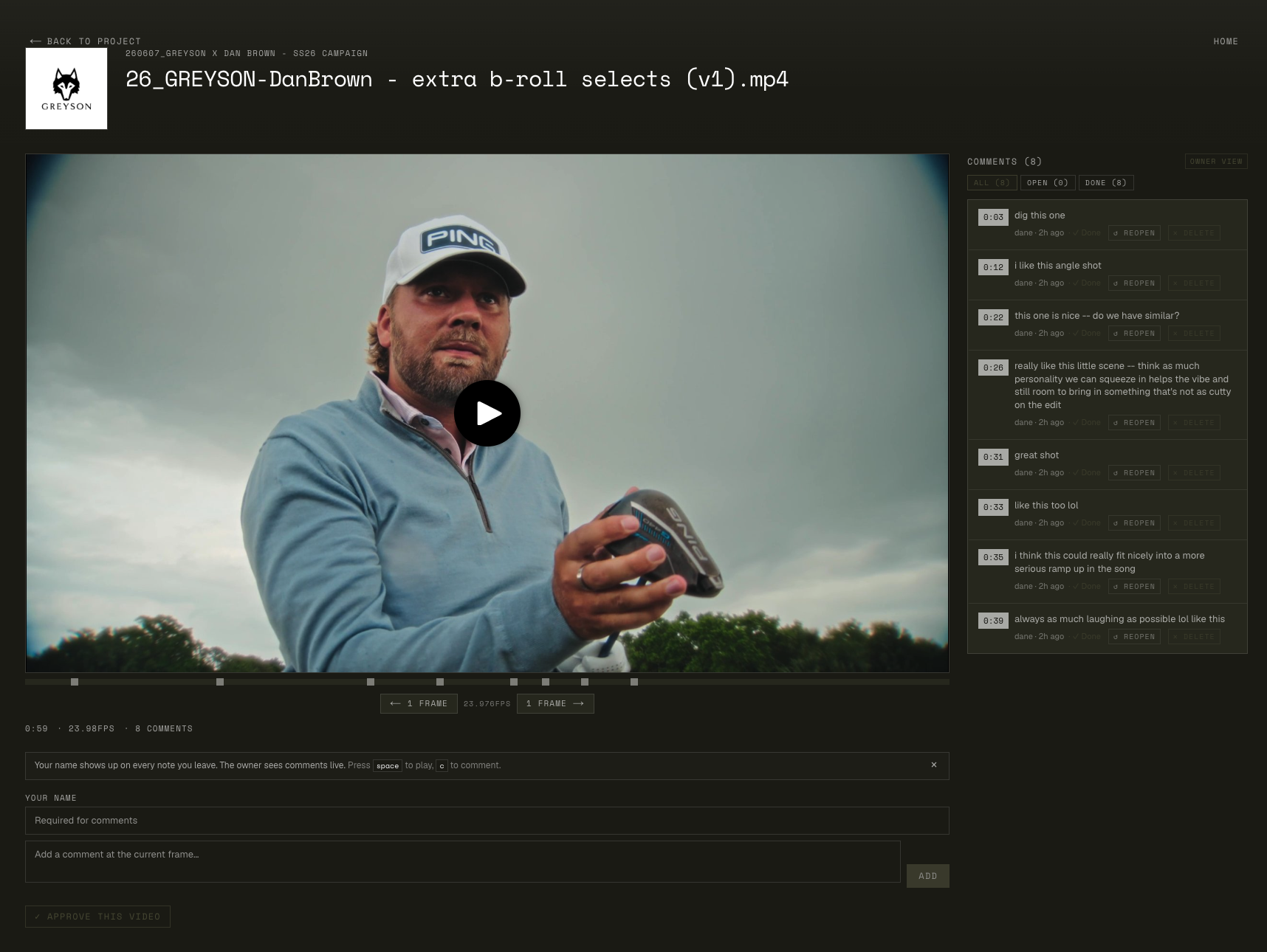
Everyone comments on the same review link, at timecodes, under their own name. Threads, replies, and reactions keep the debate attached to the frame it's about. The editor reads one page, not your summary.
The friction
'Approved' isn't written down anywhere
The client said 'looks great' on a call. Three weeks later a revision request arrives and there's no record of what was signed off.
What this does instead
Approval is a button on the review link: per video, on the record, with the approver's name. Done means done, in writing, on the same page as the notes.
The friction
Deliverables vanish into silence
You send the masters and hear nothing. Did the agency download them? Did the files arrive intact? You find out when something's missing.
What this does instead
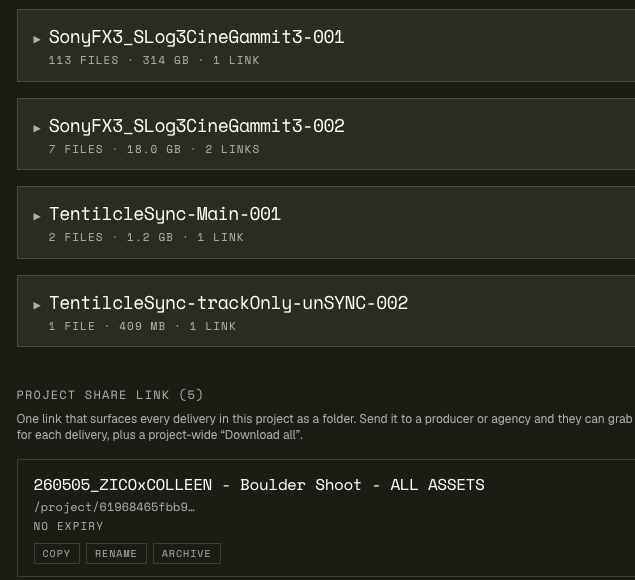
You're emailed when downloading starts, and the delivery page carries a CSV manifest of every file, size, and path, so 'did you get everything?' has a checkable answer.
The friction
Every guest costs a seat
Per-seat review tools make you ration access: the client's legal reviewer, the brand manager, the second agency contact each become a billing question.
What this does instead
Stakeholders are guests, not seats. Send the link to five reviewers or fifteen. Nobody signs up, nothing changes on the bill. Password-protect the sensitive ones.
A delivery you answer for
From rough cut to signed-off masters
- 01
One link per audience
Create a review link for the client and, if you need one, a separate link for internal review, each with its own comment stream. Password-protect the unreleased campaign.
- 02
Stakeholders comment where it counts
Everyone's notes land at timecodes under their names. Reviewers can opt into an email when their note gets answered, which retires the 'any update?' follow-up.
- 03
Versions stay sorted on their own
New cuts stack on the same link. Stakeholders always open the current version, and prior cuts remain a click away when someone asks what changed.
- 04
Approval goes on the record
The decision-maker clicks Approve on the video itself. You screenshot nothing; the link is the paper trail.
- 05
Masters go out under the project's name
The delivery link holds the full deliverable set in its real folder structure: original quality, optional password, no expiry while the subscription is active.
- 06
Receipts, not silence
Download-started emails tell you the agency actually collected the files; the manifest settles exactly what was in the handoff.
The two pages you're judged on
The review link and the delivery
Left: the review page your stakeholders see, with the player, timecoded notes, and approve button. Right: the master delivery the client keeps, with folders, sizes, and manifest.
Questions producers ask
Frequently asked
Can different stakeholders get different links?
Yes. A project can carry multiple review links, so the client, the internal team, and legal can each have their own page and comment stream. Master delivery links are separate again, so reviewers never stumble into deliverables.
Is approval actually recorded, or is it just a reaction?
Recorded. Approve is a deliberate button on the review page, stamped with the approver's name, per video. It's the difference between 'they seemed happy' and a sign-off you can point at.
How do I know the client received the deliverables?
Two ways: you get an email when a recipient starts downloading (throttled to one per session, not one per file), and the delivery page's CSV manifest lists every file with its size and folder path, so both sides can verify the handoff file-for-file.
Can I password-protect sensitive cuts and deliveries?
Yes. Both review links and delivery links take an optional password. Share the link in one channel and the password in another for anything unreleased.
What does this cost compared to per-seat review tools?
Flat tiers at $9 / $19 / $35 a month, with reviewers, clients, and vendors as unlimited guests. On per-seat tools, a production with ten stakeholders is ten seats; here it's one subscription regardless of how many people open your links.
Do stakeholders need to install anything?
No. Review pages and deliveries open in any browser, phone included. The only optional install is the free Mac app for people pulling large deliverables: it preserves folder structure on disk and resumes interrupted downloads.
Can vendors send files back to us through it?
Yes. Receive links accept uploads from anyone, no account: the color house drops the graded masters, the sound mix comes back, and you're notified when an upload finishes, with the uploader's email attached for follow-up.
Put one delivery on the record
3-day trial. Run one client approval and one master handoff through it.
If the status meeting gets shorter because the link already answers the questions, it's working.