Built for · the one-person post house
You're the whole pipeline. Your tools should act like one.
A freelancer runs review, transfer, delivery, and backup alone, usually across four subscriptions that don't talk to each other. A review link from one tool, a transfer from another, a Dropbox folder for the masters, and a client who can't tell which link is which. This is the whole workflow in one place, under your name.
4 things that go wrong
What eats a freelancer's week, and how this fixes it
The friction
Four subscriptions for one job
A review seat, a per-GB transfer tool, a cloud folder, a backup. Each one bills separately and none of them share a project.
What this does instead
Review, transfer, delivery, and a synced project folder in one subscription. Solo is $9 a month flat. One login, one bill, one place your client ever sees.
The friction
You look like a person, not a company
Clients get a wetransfer.com link one day and a dropbox.com permission request the next. The experience is the brand, and it isn't yours.
What this does instead
Every link your client touches is one consistent, professional surface: the review page, the delivery page, the receive page. Small crew, big production value: the link matches the work.
The friction
Per-seat pricing punishes collaboration
Frame.io-style tools charge per user, so pulling in a sound mixer or a second editor for one job means another seat you pay for all year.
What this does instead
No seats. Clients, colorists, and collaborators are guests: they open your links in a browser with no account. You pay for your subscription, not headcount.
The friction
A heavy month blows up the budget
Per-GB transfer tools bill by volume: the month you deliver a 1 TB job is the month the bill spikes, right when the invoice hasn't been paid yet.
What this does instead
Flat tiers with a pressure valve: upgrade to Studio for the heavy month, do the work, drop back at the next billing date. Upgrades prorate; you never sign an annual contract.
A real freelance job
One job, start to finish, one tool
- 01
Send the cut for review
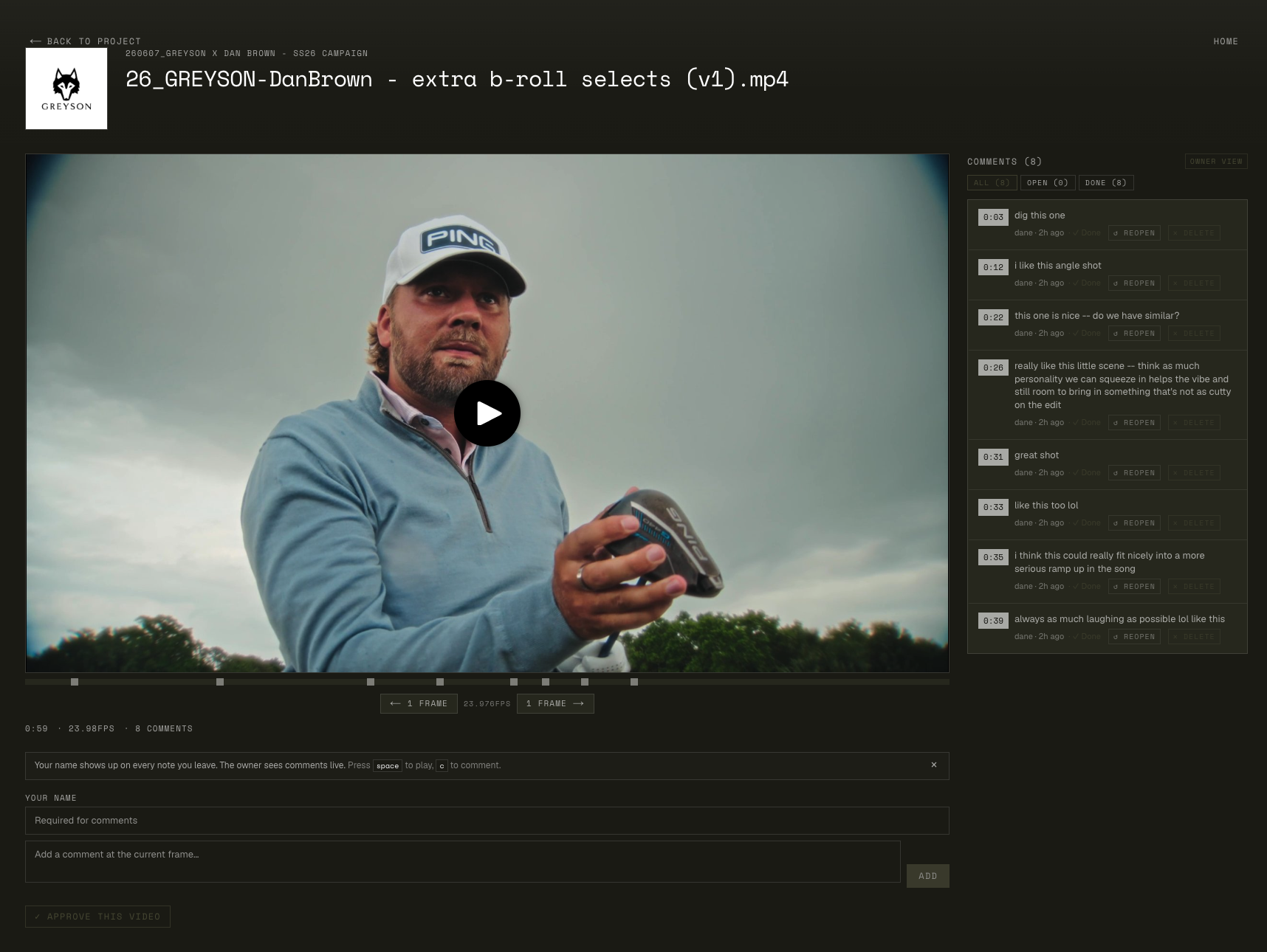
Upload the cut, share a private review link. The client comments on timecode. No account, no install. Replies and 👍 reactions keep the thread in one place, and they can opt into an email when you answer their note.
- 02
Pull the notes into Resolve
The free Resolve app drops their comments onto your timeline as markers, renders the revision with your preset, and uploads the new version straight to the same review link.
- 03
Hand off to color or sound
One transfer link per handoff: 7 days, extendable another 7 in one click if they're slow to grab it. They send files back through a receive link, no account on their side.
- 04
Deliver the masters
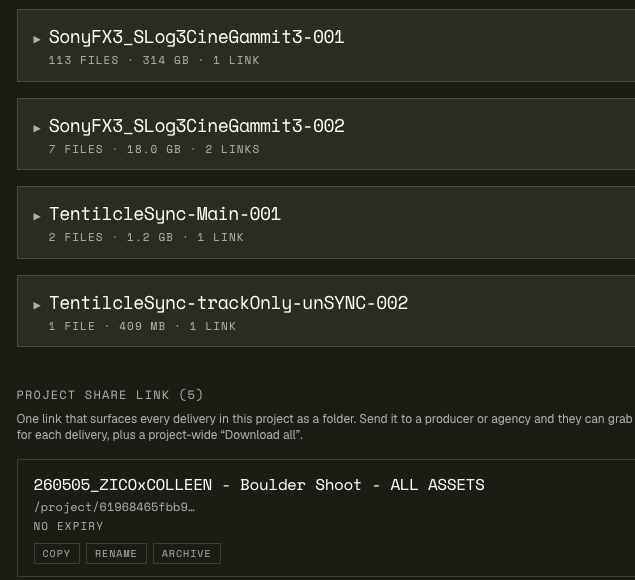
Upload the final folder once. The delivery link is password-protectable and doesn't expire while you're subscribed. When the client loses it in eight months, you re-share the same URL instead of re-uploading.
- 05
Know what happened
You get an email when the client starts downloading, and the delivery page's CSV manifest settles 'did we get everything?' without a call.
The client's view
What your client sees, both moments that matter
Left: the review page where they comment on timecode. Right: the delivery page where they collect masters. Folder structure intact, no sign-up wall on either.
Questions freelancers ask
Frequently asked
Do my clients need an account?
No. Review links, delivery links, and receive links all open in any browser with no sign-up. The subscription is yours; everyone you work with is a guest. The only person who ever logs in is you.
What does it actually cost?
Solo is $9/month: 500 GB storage, 3 hours of review video, 30 minutes of encoding and 300 GB of transfer per month. Studio ($19) and Pro ($35) raise every cap. There's a 3-day trial on every plan and no annual contract, and you can upgrade for one heavy month and drop back down at the next billing date.
Can clients comment on the video with timecodes?
Yes. They scrub to a frame, click into the comment box, and the note lands at that timecode. They can reply in threads, react with a 👍, and optionally leave an email to get notified when you answer. New versions of the cut stack on the same link, so the review URL you sent on day one stays good through v8.
How do I send raw footage or big project files?
File Transfer: drag a folder in (structure preserved), share the link, it auto-expires after 7 days. If the recipient is slow, one click extends it another 7. Transfers count against your monthly budget (300 GB on Solo) instead of billing per GB, so a 200 GB send costs the same as a 2 GB one.
Does it replace Dropbox for final deliveries?
For deliverables, yes. That's the point of Deliveries. Files live at original quality, folder structure preserved, behind a link that doesn't expire while your subscription is active, with optional password protection. It's not a general cloud drive; it's the professional handoff surface between you and the people who pay you.
I edit on two machines. Does the project follow me?
Project Sync does exactly that: point the free Mac app at the project folder on each machine and files flow between them. It's also how a folder becomes magic: flag your exports folder for review or delivery, export into it from any program, and the app publishes the file on its own once the export finishes writing.
What happens to my files if I cancel?
Your links stop being live when the subscription lapses, but nothing is deleted out from under you on day one: you can export everything first, and deleted items sit in a 30-day trash while you're active. The files are yours; the subscription is for the hosting and the links.
Try it on a real job
3-day trial. Run one client job through it: review, handoff, delivery.
If you cancel two of your other subscriptions afterward, that's the answer.